
DOWNLOADS · VIDEOS
Software download
Get Singing Stream Savior here and find operation videos as they become available. You can review the release information before downloading; videos load only after you choose to play them and never autoplay.
Download Singing Stream Savior
Extract the ZIP, then open “Singing Stream Savior.exe” in the top-level folder. It also shows the version-check status and asks before installing a future update. Do not move the internal DLLs or folders separately.
20c4b69d792efcf6afef4e74a42ae9778cd8012ff583cbffb3ebb9dc995a3cfd
Seeing a Windows protection message on first launch?
Singing Stream Savior is independently developed by one person, and its Windows executable is not yet signed with a trusted code-signing certificate. SmartScreen may therefore show an unknown publisher or unrecognized app warning. Unsigned does not mean malicious, but Windows cannot use a certificate to verify the publisher or detect tampering.
-
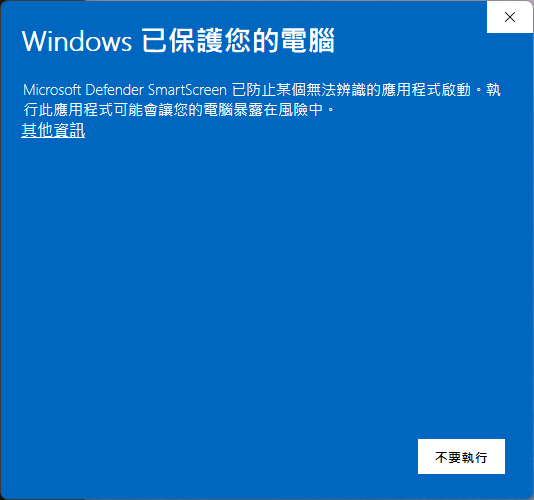
Select “More info”This reveals the application name and the hidden run option. -
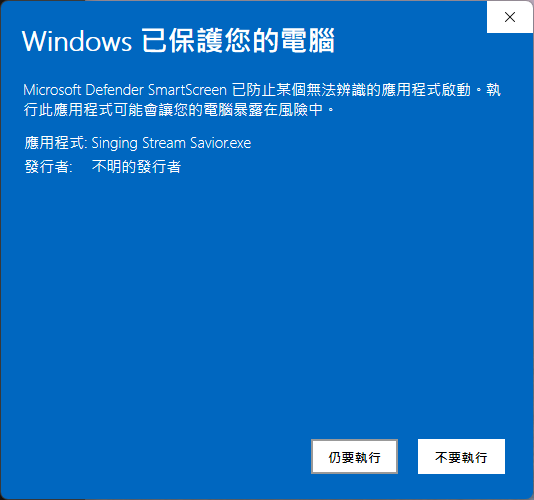
Select “Run anyway”Continue only when the download source is correct and the SHA-256 above matches the file.
Download only from this page or the official NoonIsAwesome/Singing-Stream-Savior-Updates GitHub Release. SHA-256 verifies that your download is identical to the published file.
Unsigned independent software can sometimes trigger heuristic false positives, including during the developer’s own testing. Update the antivirus definitions and verify the official source, filename, and SHA-256. Do not run the file if those details differ.
The app requires no registration or login and contains no advertising, user tracking, or analytics telemetry. It does not upload songs, lyrics, audio, microphone content, projects, or personal files to the developer.
Projects, settings, and audio processing remain on your computer. Only optional features such as YouTube, online lyric or cover searches, and update checks connect to the relevant third-party service.
Operation videos
Short videos based on the actual app interface will cover first-time setup, OBS output, and lyrics.
Singing Stream Savior × OBS workflow demo
A real workflow showing karaoke playback, theme switching, synchronized lyrics, and the final OBS output.
You can even use it to practise songs
Select the lyric you want to practise and the karaoke track jumps to its timestamp—no more guessing the section on the player timeline. This demo is silent.
Card list and BGM playlist quick demo
Shows how to switch song-list views, use the card layout, and change background music from the BGM playlist. This silent demo uses the Traditional Chinese interface.